


S T R I V E
October 23rd, 2017

WebRTC Live Streaming – It’s like satellite TV, but for OTT!

BitTorrent VS WebRTC

Maybe some of you are still familiar with things like BitTorrent, which was famous for sharing illegal content.

speed_up_icon

“BitTorrent is a peer-to-peer file-sharing protocol that enables massive distribution of files over the Internet. It allows users to share very large files like movies, books and TV shows. 

The BitTorrent protocol helps to efficiently download files from the Internet. It allows an unlimited number of users to connect to a site simultaneously without causing the server to run out of bandwidth.

BitTorrent is an open-source, peer-assisted program that was developed in Python programming language by Bram Cohen in 2001.”

Source: Techopedia – What does BitTorrent mean?

The technology in the background is called peer-to-peer (P2P), which means that the users exchange content directly without a server.

P2P has many advantages when it comes to performance and efficiency because your network scales automatically with its size without any additional servers. Especially regarding file sharing, where it is very hard to detect and identify users who are sharing content. But based on its history, P2P got a very bad reputation and is almost gone nowadays.

So WebRTC is something like BitTorrent?

Actually, that is one of the most frequently asked questions.

The answer is clearly: NO. WebRTC has nothing to do with BitTorrent.

While it is true, that both BitTorrent and WebRTC transport data serverless between users (which is the definition of P2P), BitTorrent is actually a decentralized file-sharing protocol, whereas WebRTC is an open web framework to create real-time media web applications using P2P technology.

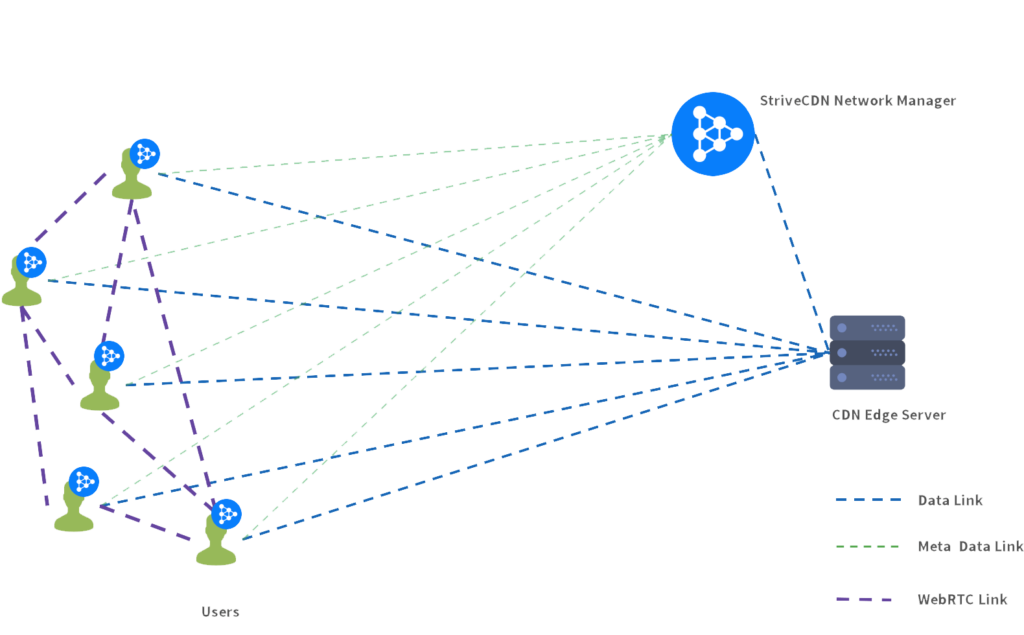
At StriveCDN we utilize WebRTC to implement our innovative solution called TrafficBoost, which can be used on top of any OTT live streaming provider like Youtube or Facebook Live or any online TV service. Using WebRTC we can connect viewers watching the same live-stream among each other to share parts of the stream.

strive-p2p-no-headers

TrafficBoost divides live streams into multiple parts. It also divides the parts into segments, which are announced to one viewer at a time. We call them chunks.

The connected viewers (peers) work as a swarm, meaning the peers share every chunk via WebRTC data channels. The swarm acts as one viewer from the serving point of view causing only a fraction of the original traffic. The side effects due to reduced data traffic are better stream stability, less latency and an increase of available bandwidth for the streaming provider.

We are always better and never worse.

Of course, we work out of the box with any CDN, so if you currently operate your live streams using Akamai or any other CDN, we can reduce your monthly traffic cost by up to 90%. We achieve these impressive savings by using the viewer’s upload bandwidth.

So with TrafficBoost, broadcasters can operate OTT live streams with a similar cost model as satellite or cable TV. More specifically, the number of viewers has much less impact on your final streaming costs. We are very proud, to be one of the first companies in the world, offering this solution.

About StriveCast

StriveCast is a leading technology provider for eCDN solutions. Our WebRTC-based P2P mesh network is used by large companies like Swisscom, Siemens, Gazprom, and NEP group to solve the problem of network congestion during live events. Based in Germany, we are constantly improving and adapting our cutting-edge P2P technology in order to provide the next generation of enterprise video delivery. Today, StriveCast connects over 150,000 users worldwide on a daily basis, saving customers up to 95% of CDN traffic with a unique server-side-managed Peer-To-Peer network.

Cookie Consent Management

Here you can select individually for which services you want to allow cookies to be enabled. Further information about these services can be found in our Privacy Policy.

You can change your cookie settings at any time by clicking on the “Cookie Management” link at the bottom of the page. In order to apply the changes, the page must be reloaded.

Services